
Suppose that you have just completed a school project. You have put effort into it and presented it well with images and interesting facts. You demonstrate it to your teacher and other students in the school. 20 or 30 people will see it.
However, what would happen should you be able to present the same presentation to thousands of people, or even millions of people, all across the world? And what would happen should a student in a different country look at your project on the Solar System and do their homework? What would happen if a company could present a new chocolate bar to thousands of clients?
PPT submission sites resemble giant online presentation platforms. You can post your work to allow everyone to view it, learn from it, and share it with others. It is a simple concept, but one that is highly potent.
This article will consider all aspects of these websites. We will find out what they are, why they are beneficial, and how you can make use of them to express your own ideas to the world. We will make it as simple and easy to follow as possible.
What is a PPT submission? | Why people and businesses use it
PPT submission refers to uploading your presentation file on a site. PPT is an abbreviation of PowerPoint, a typical slide making tool. However, it is also possible to transfer files of other applications, such as Google Slides or a PDF.
It is similar to uploading a video on YouTube or a picture on Instagram. You make something and wish to share it with other people on the internet. A PPT submission is simply a submission of slides and documents.
So why do people do this? There are many good reasons.
- To students and teachers: A student may submit their research work to assist other students. A teacher will be able to post lesson notes to allow students who missed a lesson to learn. One can share knowledge, which is a good way to benefit the learning community. The example is when a teacher in Lucknow exchanges a lesson in math with a student in Mumbai.
- To businesses: A business can present a presentation concerning its products. A case in point is a bakery that may prepare a PPT named 10 Delicious Cakes We Make. The viewers may desire to go to the store. It is an advertisement and provides useful information.
- To bloggers and marketers: A blogger is an author of the articles on his or her site. They are capable of transforming an already popular article into a brief and colorful presentation and posting it. On the final slide, they are able to add a link to their blog. The individuals viewing the presentation may press the link to read more.
- To specialists: When a person is well informed about a subject, such as gardening or computer code, they are able to come up with an informative presentation. People will view such a person as an informed and credible authority when they see it. This will assist the professional in developing a positive reputation.
What Are PPT Submission Sites?
PPT submission sites are websites that are dedicated to storing and sharing presentations. They are online huge libraries, only that they do not contain books but millions of presentations on every subject.
By posting your presentation, you do not simply store it, but the site displays it to individuals who are searching on the same topic. As an illustration, when you post a PPT on “Famous Forts in India”, it will show up to those who search the internet with the keywords of India forts or Indian history.
The sites are highly popular and visited by millions of people daily. This will ensure that your work is exposed to a large number of people. They are created in order to assist you in locating, watching and sharing presentations with greater ease. You just view the slides through your web browser, as you read a computerized book. It is also possible to download them or share them with friends on social media.
These platforms form a gathering point to learners and to those who desire to share.
Different Types of PPT Submission Sites & Their Benefits
Not every PPT submission site is similar. There are various types of them and their purpose and advantages vary. Let’s look at the main types.
1. High DA Global Sites
The DA of the site is high, indicating that the site is popular. DA is an index between 1 and 100 which informs about the trustworthiness of a site on Google. A high DA site is one that receives high visitors and Google believes it is trustworthy.
- Benefits: When you upload a PPT on a high DA site, you are putting your art in a big gallery. Many people will see it!
2. Niche / Academic Sites (Academia.edu, ResearchGate)
Niche refers to specializing in a given subject or field. These are not the sites everybody can visit. These are the special ones, such as scientists, researchers and university students.
3. Business / Professional Sites (LinkedIn Slide uploads, Zoho Docs)
These sites are business and work oriented. They are used by people to exchange work presentations, develop their professional image, and network with other people in their industry.
4. Indian / Local Sites – regional opportunities for localized SEO
There are occasions when you do not want to target the entire world. You simply want to reach people within your city, state or country. This can be helpful through local sites. Localized SEO is just the process of making yourself visible in Google to people in the local area.
- Benefits: This will enable you to reach the local audience, which will most probably turn into your customer. As a person in India types the name of something you are selling, your local-based presentation can be displayed. This can be extremely effective to small, local businesses.
Local targeting is the key advantage in this case. You are talking to people that you are living in.
Benefits of PPT Submission for Users
We have already mentioned some of the advantages, but here are some listed. There are some brilliant advantages in using PPT submission sites.
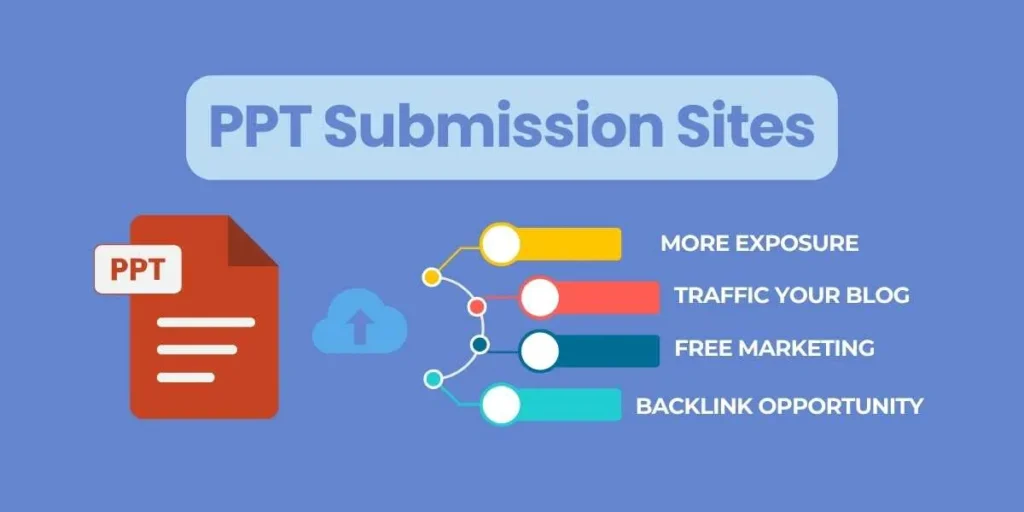
- Gain More Exposure: The greatest advantage is that your work will be viewed by a wide range of individuals than only your close network. This disseminates your thoughts and your name.
- Optimize Your Web Site: SEO is the acronym that means getting your site to the top of Google. A backlink is a link that you place on a PPT when you post it and include a link to your web site. Google considers backlinks on popular PPT submission sites as one of the votes of confidence.
- Become an Expert: People will begin to view you as an expert when you constantly present helpful and informative talks on a subject matter. This creates confidence and increases the chances that people can listen to you or purchase out of you.
- Traffic Your Blog or Web Site: You may put clickable links on your presentation. A viewer could read your presentation on Top 5 Travel Tips to Goa and then at the end of the presentation, he would have the option of clicking on the link that would take him to your travel blog to get more information. This directs new visitors towards you.
- It is Free Marketing: The majority of these sites are free. It implies that you will be able to receive free advertising of your business, blog, or personal brand. You only have to get time to come up with a good presentation.
Who Can Benefit Most from PPT Submission?
It can benefit virtually everybody who has something to say. It is of particular use to some groups:
- Students: Share tutorials, projects, and study manuals: students. They create a portfolio of their work and assist other students.
- Teachers and Educators: broadcast lesson plans, lectures and teaching materials to a global classroom.
- Small Business Owners: promote products and services on a free basis, find new customers, and tell them what they do easily.
- Digital Marketers: make their clients better at SEO, traffic to sites, and create content that is shared by a large number of people.
- Bloggers/Content Creators: repackage their current content (such as blog posts) in a new form (a presentation) and attract a new audience.
- Job Seekers: introduce some presentation style resume or portfolio to demonstrate the skill and experience in an innovative way.
Advanced Metrics to Judge PPT Submission Sites: How to Choose the Right One
You have numerous sites to visit, how do you select the most appropriate one? You are able to consider some of the numbers and factors and make a judgment of them. We will not complicate it, don’t worry.
- Domain Authority (DA): DA demonstrates the strength of an entire web site, whereas Page Authority (PA): PA demonstrates the strength of a single page. A score of over 60 normally indicates that the site is credible and dependable. Free applications such as MozBar can be used to check these scores.
- Spam Score: This displays the probability of a site containing bad or poor links. The lesser the score (preferably about 1%), the better. The score is high, which indicates that you are likely to avoid the site.
- Traffic on the Web site: Get a sense of traffic a site receives monthly. Millions of visitors are better since more people will view what you are offering. Such tools as Similarweb are able to demonstrate this number.
- Relevancy: Ensure that the site suits the subject. In the case of a cooking presentation, a food site would be preferable compared to the science site despite having a higher score. The most important thing is your audience.
Free/Paid, High DA/PA - What will be the best for you?
- Beginners: Follow the path of the free, popular services SlideShare or Scribd. They are effective among the majority. They reach massively, Google has faith in them and they are free. This is a good start.
- For Specialists: Everything else being equal, a niche site such as Academia.edu is preferable, despite being slightly lower in DA. What is more important is the right audience.
- For Businesses: Mix it up. Network through LinkedIn and a social site that is popular all over the world to access more customers.
- Paid: There are those sites that have paid plans. They can offer additional capabilities like superior analytics, advertisement-free, or increased customization. The free version is sufficient for most individuals. Make payments when you are a serious business and require those additional features.
- The ultimate solution: To 99 percent of the users, a free, high-DA site that fits their topic is the best option.
List of Free High DA PPT Submission Sites
How to Submit PPTs for SEO & Higher Visibility: Step-by-Step Guide
It is not limited to making and uploading a PPT. People also need to find it easy. The following are basic steps to follow.
Step 1: Prepare an excellent presentation.
Your PPT should be valuable. Do not simply put some text on slides.
- Select an Irresistible Title: Select a title that arouses interest. It is better to write 5 Surprising Ways Our Business Grew in 2025 instead of the Business Report.
- Pictures and charts are noticeable: Use More Pictures, Less Text. Make every post slide full of pictures and a few brief words.
- One Idea/ Slide: There should be only one unambiguous idea on a slide.
- Add Your Branding: Add your name, logo or web address to each slide perhaps in a corner.
Step 2: Optimize It for SEO
Write a list of the words that people may enter into Google before uploading your topic. These are called keywords. In the case of chocolate-cake PPT, we might use such keywords as chocolate cake recipe or how to bake a cake.
- Include your main keyword in the file name: e.g. you can rename a presentation1.pptx as chocolate-cake-recipe.pptx.
- Add keywords in the title and all through.
Step 3: Save as a PPTx OR PDF
Although you are allowed to upload PPT files, it is better to save the presentation in the form of a PDF. A PDF ensures the same format, fonts, and pictures on any computer or device and that is why it is reliable and universal.
Step 4: Select the appropriate Website.
Given your objectives, you need to choose a sharing site. To illustrate, you may opt to use SlideShare.
Step 5: Upload and Account Creation.
Sign up for an account. It’s usually free. Locate the attached button Upload and make a selection of your PDF.
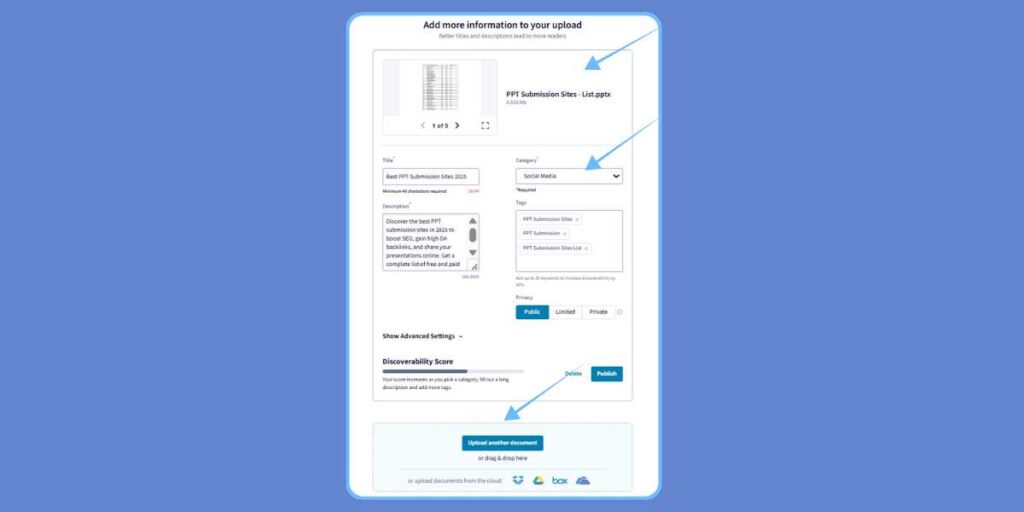
Step 6: Complete the Details (It is extremely important)
On uploading, a form will appear. It is here that you tell the PPT submission sites (and Google) what your presentation is about.
- Title: This is the most crucial part. Keep it short and sweet and have your key word. As an example, “Easy and Delicious Chocolate Cake Recipe.”
- Description: Calculate a brief paragraph or two describing your presentation. Use your keywords naturally. Describe what people are going to learn. Sell your presentation. This is your opportunity.
- Tags: Tags are like labels. Add 5‑10 relevant keywords. Illustration: cake, baking, recipe, dessert, chocolate, cooking. Tags assist the site to display your content to the correct individuals.
Step 7: Provide a Link Back to your Web Site.
This will assist in driving traffic and also enhancing your SEO.
- In the Description: The majority of websites allow placement of a clickable link in the description. Write the following: “To get more amazing recipes, use my blog: https://www.myfoodblog.com.
- Within the Presentation: In the first or the final slide, there should be a clear Call to Action. As an example, a very graphic slide with the text, Find the full recipe and video at www.myfoodblog.com. should be easy to read and recollect
Step 8: Publish and Share
Click the “Publish” button. It is not enough to leave it once it is alive. Post the link to your new presentation on social media, such as on Facebook or Twitter, to receive the initial few views.
Advanced SEO Techniques in PPT Submissions
These additional tips will lead to even greater results in case you want it.
- Turn links active: Suppose you provide a presentation in PowerPoint or Google Slides, you should create links which can be cloned. Rather than typing the URL, take the insert hyperlink option. When you save it in PDF, the link is normally left as a clickable one, and people find it easier to access your site.
- Make a call to action: Do not count on visitors coming. Tell them to. Action words should be used like Visit Now, Learn More, and Download Free Ebook. An obvious CTA would do wonders.
- Have a text version of your presentation: Enter a text version of your presentation on the description field on the submission site. This also provides the web site and Google with additional material to read and comprehends your subject matter better and ranks it higher on the keywords.
Advanced Content Strategy with PPTs
One PPT is not enough to leave it. Think bigger!
- Turn Your Popular Blog Post into a Presentation: Repurpose Your Best Content. Select the key areas, including illustrations and posts. This is a new life and a new viewer to your old content.
- Develop an Annual Series: Do not cram all the stuff in one presentation. Divide a large subject into a number of parts. E.g. The Beginner’s Guide to Gardening, Part 1: Selecting Your Plants, Part 2: The Right Soil, etc. This leaves people returning to the same.
- Revise Your Presentations: In case you are using an old presentation and are still viewing it, include new information and re-upload the same. This makes your contents updated and appropriate.
Measuring Success: How to Track PPT Submission ROI
But do you know whether all this work is paying off? ROI is an abbreviation of Return on Investment. Due to the time you are spending, you would wish to get a good payoff. Here is how to measure it.
- Views, Downloads, Shares: These are the simple figures that will be displayed on the PPT site. They inform you of the number of people who view your work. It is a good first sign.
- Website Referral Traffic: This is the most vital SEO measure. Apply a free service such as Google Analytics on your webpage. The reports indicate the source of visitors. In case you notice SlideShare or Scribd traffic, it is working. You will be able to view the amount of people that clicked on the link in your presentation and visited your site.
- Lead Generation: When you include a contact us or sign up link, monitor the number of people who are clicking that. This demonstrates whether your presentations will attract potential customers.
- Keyword Rankings: Monitor the ranking of your site on Google using your target keywords. When your rank increases with time as you continue to submit a number of PPTs, that is a good indication that your backlink strategy works.
Risks & How to Avoid Them
Presentation of PPTs can be considered as safe, albeit a few minor threats.
- Theft Of Content: Your PPT can be downloaded by people and they can present it as their own.
- How to Avoid: Place your name, logo or your web site on each slide. That shows who made it. Include a copyright notice, such as: © 2025 Your Name.
- Poor Quality Sites: Submission of your PPT to a spammy site may damage your SEO. Google is making the assumption that you are associated with bad websites.
- Prevention Method: Use familiar reliable websites. We have enumerated security options such as SlideShare, Scribd, Issuu.
- Duplicate Content: Do not upload one and the same PPT to numerous sites. Google might not be aware of which one is original and it might be ranked low.
- How to prevent: Be selective on the extent of good sites. Select 3-5 topical locations and leave them. Re-write the title and description somewhat to render each one different.
Conclusion & Action Plan
PPT submission sites are a free, easy and effective tool. Not to mention that they allow you to change even an elementary presentation into a marketing instrument that could reach thousands of individuals, promote your site to the top of Google, and make you an authority in your sphere.
It is a megaphone to share your ideas to the entire world. All that is required is a bit of time and effort to make something useful.
Ready to start? Here’s a simple plan.
- Choose a Subject: Consider something that you are familiar with. It may be a subject in school, something that is a hobby or a subject that is connected to your business.
- Develop a Basic 10-Slide Presentation: You do not need to be a genius. Write an interesting heading, type with large fonts, include nice pictures and on the final slide, place a link to your blog, social media profile, or web site (when you have one).
- Post it in SlideShare: Go to SlideShare.net, register a free account and post your presentation. Enter in the title, description and tags.
That’s it! Thou hast taken thy first hand at submission in PPT. Monitor its number of views per week. The findings may be shocking. There you can do more and visit other sites making this simple trick a major aspect of the way you share your knowledge with the world.
FAQs
What is a PPT submission site primarily all about?
This is primarily to share presentations and documents with a large number of individuals online. This will allow individuals to exchange information, advertise and assist their site to appear in Google search results.
Do the majority of these PPT submission sites cost nothing?
Yes. Nearly all the popular and convenient websites such as SlideShare, Scribd, and Issuu have free plans that suit the majority of users. They offer the primary functionalities that you require to share and upload your work.
What is the best site for PPT submission to be a beginner?
SlideShare is generally the most suitable alternative for beginners. It is simple to operate, has high customer base and is reputed by Google, which assists in search ranking.
Am I able to include a clicklink in my presentation?
Yes. The most appropriate is to include a hyperlink to your text or an image as you are creating the presentation in PowerPoint or Google Slides.